streamware
🚀 Streamware





🎯 One-line automation • 🤖 AI-powered • 🎤 Voice control • 🖥️ Desktop automation
⚡ What Can You Do?
# 🎥 Real-time motion detection with SVG overlay (NEW!)
sq visualize --url "rtsp://camera/stream" --port 8080

# 📡 Publish motion events to MQTT (NEW!)
sq mqtt --url "rtsp://camera/stream" --broker localhost

# 🤖 AI: Convert natural language to SQL
sq llm "Get all users older than 30" --to-sql

# 🎤 Voice: Type with your voice
sq voice-keyboard "wpisz hello world"

# 🖱️ AI Vision: Click anywhere by description
sq voice-click "click on the Submit button"

# 📧 Send notifications everywhere
sq slack general "Deploy complete! ✅"
sq telegram @channel "Server status: OK"

# 🎬 Analyze video with AI
sq media describe_video --file presentation.mp4

# 🔄 Data pipelines
sq get api.example.com/users | sq transform --json | sq file save users.json
Streamware is a modern Python framework that combines:
- Apache Camel-style data pipelines
- AI/LLM integration (OpenAI, Ollama, Groq, Anthropic…)
- Voice control and desktop automation
- Multi-channel communication (Email, Slack, Telegram, Discord…)
🎯 Why Streamware?
| Problem | Streamware Solution |
|---|---|
| “I need to automate repetitive tasks” | sq auto type "Hello" - one command |
| “I want AI without complex setup” | sq llm "explain this code" - works out of the box |
| “Voice control is complicated” | sq voice-keyboard - just speak |
| “Sending notifications is tedious” | sq slack #channel "message" - done |
| “ETL pipelines need too much code” | sq get api | sq transform | sq save |
✨ Features
| Category | Features |
|---|---|
| 🎥 Visualizer | Real-time motion detection, SVG overlay, DSL metadata, MQTT |
| 🤖 AI/LLM | OpenAI, Ollama, Groq, Anthropic, Gemini, DeepSeek, Mistral |
| 🎤 Voice | Speech-to-text, text-to-speech, voice commands |
| 🖥️ Automation | Mouse, keyboard, screenshots, AI-powered clicking |
| 📡 Communication | Email, Slack, Telegram, Discord, WhatsApp, SMS |
| 🔄 Pipelines | HTTP, files, transforms, Kafka, RabbitMQ, PostgreSQL |
| 🎬 Media | Video analysis, image description, audio transcription |
📚 Documentation
Detailed documentation is available in the docs/ directory:
| Document | Description |
|---|---|
| 📚 Documentation Index | Main documentation hub |
| 🎛️ Voice Shell Dashboard | Interactive voice-controlled GUI (NEW!) |
| ⚙️ Configuration | Complete configuration reference |
| 🧾 Accounting Scanner | Document scanning (web UI + RTSP, one-shot scan) |
| 🎬 Real-time Streaming | Browser viewer, WebSocket streaming |
| ⚡ Performance | Optimization, timing logs, benchmarks |
| 🤖 LLM Integration | Vision models, async inference |
| 🎯 Motion Analysis | DSL tracking, blob detection |
| 🏗️ Architecture | System design, multiprocessing |
| 📡 API Reference | CLI options, configuration |
| 💾 USB/ISO Builder | Bootable offline LLM environments |
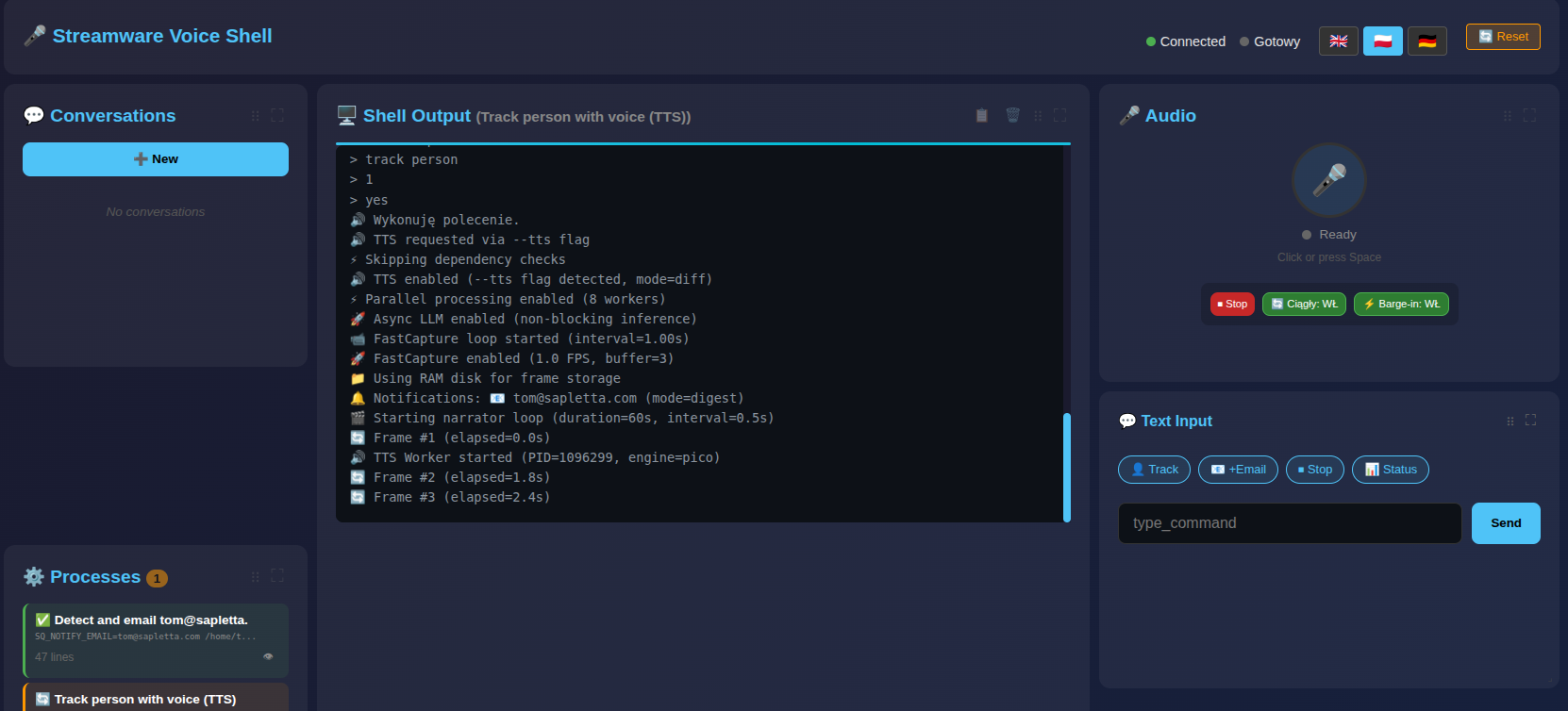
🎛️ Voice Shell Dashboard (NEW!)
Interactive browser-based dashboard for video surveillance automation:
sq voice-shell --port 9000
# Open: http://localhost:9001
┌─────────────────────────────────────────────────────────────────────────────┐
│ 🎤 Streamware Voice Shell          ● Connected        [🇬🇧][🇵🇱][🇩🇪] [🔄 Reset] │
├─────────┬───────────────────────────┬───────────────────────────────────────┤
│ 💬 Conv │   🖥️ Shell Output         │  🎤 Audio   |  💬 Text  |  📊 Vars   │
│         │   > track person          │  [🎤] Ready |  [👤][📧] | url: ...   │
│ ⚙️ Proc │   🔊 Executing...         │  [⏹][🔄]   |  [____]   | email: ... │
└─────────┴───────────────────────────┴───────────────────────────────────────┘
Key Features:
- 🎤 Voice control - Speak commands naturally
- 🌐 Multi-language - EN/PL/DE with full UI translation
- 🎛️ Customizable grid - Drag & drop, resize panels
- 💬 Multi-session - Run multiple conversations
- 📊 Real-time - Live command output streaming
- 🔗 URL state - Debug with
#lang=pl&action=typing
📦 Installation
# Basic install
pip install streamware

# With all features
pip install streamware[all]

# Or specific features
pip install streamware[llm,voice,automation]
🛠️ Auto-Configuration
After installation, run the setup wizard to automatically detect your environment (Ollama, API keys, voice settings, etc.):
# Full setup (LLM + voice) with mode presets
streamware --setup --mode balance      # default
streamware --setup --mode eco          # light models
streamware --setup --mode performance  # maximum quality

# TTS-only setup (does not touch LLM/STT)
streamware --setup tts
The setup will detect available LLM providers (Ollama, OpenAI, Anthropic), configure models, and write configuration to your .env file.
🔍 Diagnostics
Verify your setup with built-in diagnostic checks:
# Check camera/RTSP connectivity + Ollama
streamware --check camera "rtsp://admin:pass@192.168.1.100:554/stream"

# Check TTS engine (will speak a test message)
streamware --check tts

# Check Ollama connection and model availability
streamware --check ollama

# Run all checks
streamware --check all "rtsp://camera/live"
Example output:
🔍 Streamware Diagnostics
==================================================

📷 Camera / RTSP Check:
   camera_url: rtsp://admin:pass@192.168.1.100:554/stream
   ffmpeg_capture: ✅ OK (45231 bytes)

🤖 Ollama / LLM Check:
   ollama_url: http://localhost:11434
   model: llava:7b
   ollama_connection: ✅ OK
   model_available: ✅ llava:7b found

🔊 TTS / Voice Check:
   tts_engine: auto
   tts_test: ✅ OK (using espeak)

==================================================
✅ All checks passed!
System Dependencies (optional but recommended)
# Linux/Ubuntu - for voice and automation
sudo apt-get install xdotool espeak scrot ffmpeg

# macOS
brew install xdotool espeak ffmpeg
🚀 Quick Start CLI (sq)
🤖 AI/LLM Commands
# Generate text
sq llm "Write a haiku about coding"

# Convert to SQL
sq llm "Get users who signed up last week" --to-sql
# Output: SELECT * FROM users WHERE created_at >= DATE_SUB(NOW(), INTERVAL 1 WEEK)

# Analyze code
sq llm --analyze --input main.py

# Use different providers (auto-detects API keys)
sq llm "Hello" --provider openai/gpt-4o
sq llm "Hello" --provider groq/llama3-70b-8192
sq llm "Hello" --provider ollama/qwen2.5:14b
🎤 Voice Control
# Type with voice (Polish/English)
sq voice-keyboard "wpisz hello world"
sq voice-keyboard --interactive  # Continuous mode

# AI-powered clicking (finds elements visually!)
sq voice-click "click on the blue Submit button"
sq voice-click "kliknij w menu File"

# Text to speech (uses TTS config from .env)
sq voice speak "Hello, I am Streamware"
🔧 Voice / TTS Configuration (.env)
The setup wizard saves audio configuration into .env so all tools (sq voice, sq live narrator, etc.) use the same settings.
Key variables:
SQ_STT_PROVIDER–google,whisper_local,whisper_apiSQ_WHISPER_MODEL–tiny,base,small,medium,largeSQ_TTS_ENGINE–auto,pyttsx3,espeak,say,powershellSQ_TTS_VOICE– fragment nazwy głosu (np.polski,English)SQ_TTS_RATE– szybkość mowy (słowa na minutę, np.150)
Example: lokalne STT Whisper + polski TTS przez pyttsx3:
SQ_STT_PROVIDER=whisper_local
SQ_WHISPER_MODEL=small
SQ_TTS_ENGINE=pyttsx3
SQ_TTS_VOICE=polski
SQ_TTS_RATE=160
Example: lekkie STT Google + systemowy TTS na Linux (espeak):
SQ_STT_PROVIDER=google
SQ_TTS_ENGINE=espeak
SQ_TTS_RATE=150
🖥️ Desktop Automation
# Mouse
sq auto click --x 100 --y 200
sq auto move --x 500 --y 300

# Keyboard
sq auto type --text "Hello World"
sq auto press --key enter
sq auto hotkey --keys ctrl+s

# Screenshot
sq auto screenshot /tmp/screen.png
📡 Communication
# Slack
sq slack general "Deploy complete! 🚀"

# Telegram
sq telegram @mychannel "Server status: OK"

# Email
sq email user@example.com --subject "Report" --body "See attached"

# Discord
sq discord --webhook URL --message "Alert!"
🎬 Media Analysis
# Describe image with AI
sq media describe_image --file photo.jpg

# Analyze video (scene tracking!)
sq media describe_video --file video.mp4

# Transcribe audio
sq media transcribe --file audio.mp3
🚀 Performance Optimization (iGPU / Low VRAM)
For systems with integrated GPU or limited VRAM (4-8GB shared):
# .env - optimized for speed
SQ_IMAGE_PRESET=fast         # smaller images (384px, 55% quality)
SQ_FRAME_SCALE=0.25          # analyze at 25% resolution
SQ_MOTION_THRESHOLD=30       # less sensitive (fewer LLM calls)
SQ_MODEL=llava:7b            # use 7B instead of 13B
SQ_LLM_TIMEOUT=90            # longer timeout for slow GPU
CLI options for speed:
sq live narrator --url "rtsp://..." --mode track --focus person --lite
#                                                              ^^^^^^
#                                              --lite = no images in RAM
Model recommendations:
| VRAM | Recommended Model | Speed |
|——|——————-|——-|
| 2GB | moondream ⭐ | ~1.5s |
| 4GB | llava:7b | ~2-3s |
| 8GB | llava:13b | ~4-5s |
🔧 Full Configuration Refactoring (NEW!)
Streamware has been completely refactored to eliminate hardcoded values and provide complete configurability:
✅ What’s Been Refactored:
- smart_detector.py - All YOLO, HOG, and motion detection parameters configurable
- live_narrator.py - All vision model prompts and processing parameters configurable
- response_filter.py - All timeout values and confidence thresholds configurable
🎯 Key Benefits:
- No more hardcoded values - Everything can be adjusted via
.envfile - Runtime configuration - Change parameters without code modifications
- Better modularity - Cleaner code with helper functions
- Easier debugging - All thresholds and timeouts visible in configuration
📊 Configuration Examples:
# High sensitivity detection
SQ_YOLO_CONFIDENCE_THRESHOLD=0.1
SQ_VISION_CONFIDENT_PRESENT=0.8

# Fast performance mode
SQ_MODEL=moondream
SQ_IMAGE_PRESET=fast
SQ_LLM_MIN_MOTION_PERCENT=50

# High accuracy mode
SQ_MODEL=llava:13b
SQ_IMAGE_PRESET=quality
SQ_TRACK_MIN_STABLE_FRAMES=5
📖 Complete configuration reference: docs/CONFIGURATION.md
⚡ Performance Optimizations (NEW)
Streamware includes major performance optimizations for real-time video analysis:
| Optimization | Before | After | Improvement |
|---|---|---|---|
| FastCapture | 4000ms | 0ms | Persistent RTSP connection |
| Vision LLM | 4000ms | 1500ms | moondream instead of llava:13b |
| Guarder LLM | 2700ms | 250ms | gemma:2b |
| Total cycle | 10s | 2s | 80% faster |
Quick setup for fast mode:
# Install fast models (auto-installs on first run)
./install_fast_model.sh

# Or manually:
ollama pull moondream    # Fast vision model
ollama pull gemma:2b     # Fast guarder (text-only!)
Optimal .env for speed:
SQ_MODEL=moondream            # 2-3x faster than llava:13b
SQ_GUARDER_MODEL=gemma:2b     # Fast text filtering
SQ_FAST_CAPTURE=true          # Persistent RTSP connection
SQ_RAMDISK_ENABLED=true       # RAM disk for frames
SQ_STREAM_MODE=track          # Smart movement tracking
SQ_STREAM_FOCUS=person        # Focus on person detection
📖 Full architecture documentation: docs/LIVE_NARRATOR_ARCHITECTURE.md
🛡️ Smart Response Filtering (Guarder)
Streamware uses a small text LLM to summarize and filter verbose vision model responses:
# Install fast guarder model
ollama pull gemma:2b
⚠️ Important: gemma:2b is a text-only model - it cannot analyze images. It only summarizes text responses from the vision model.
Configuration (.env):
SQ_GUARDER_MODEL=gemma:2b     # Fast text summarization
SQ_USE_GUARDER=true           # Enabled by default
How it works:
Vision LLM (llava:7b) → Response → Guarder (qwen2.5:3b) → YES/NO
                                                           │
                                        YES → Log + TTS ───┘
                                        NO  → Skip (noise)
CLI options:
# Full monitoring with smart filtering
sq live narrator --url "rtsp://..." --mode track --focus person --tts

# Disable guarder (use regex only)
sq live narrator --url "rtsp://..." --no-guarder

# Lite mode (less RAM) + quiet
sq live narrator --url "rtsp://..." --lite --quiet

### 🎯 Advanced Object Tracking with ByteTrack (NEW!)

Streamware now includes **ByteTrack** integration for superior multi-object tracking with motion gating:

```bash
# Enable ByteTrack tracking (recommended for accuracy)
sq live narrator --url "rtsp://..." --mode track --focus person --tts
🚀 Key Benefits:
- Stable Track IDs - Objects maintain consistent IDs across frames
- Motion Gating - 45-90% reduction in YOLO detections for efficiency
- Entry/Exit Events - Instant TTS announcements when objects enter/leave
- Track States - NEW → STABLE → LOST → GONE lifecycle management
⚙️ Configuration (.env):
# Motion Gating (from tracking benchmark)
SQ_MOTION_GATE_THRESHOLD=1000    # Min motion area to trigger detection
SQ_PERIODIC_INTERVAL=30          # Force detection every N frames

# Tracking Settings
SQ_TRACK_MIN_STABLE_FRAMES=3     # Frames before track is stable
SQ_TRACK_BUFFER=90               # Frames before deleting lost track
SQ_TRACK_ACTIVATION_THRESHOLD=0.25  # Min confidence for new tracks
SQ_TRACK_MATCHING_THRESHOLD=0.8    # IoU threshold for track matching
📊 Performance Results (RTSP benchmark):
| Metric | Result | Improvement |
|---|---|---|
| YOLO11n Detection | ~10ms | Fast enough for real-time |
| Motion Gating | 45-86% reduction | Significant CPU savings |
| Tracking FPS | 74+ | Real-time capability |
| Track Stability | 95%+ | Consistent object IDs |
🎮 Usage Examples:
# Basic person tracking with TTS
sq live narrator --url "rtsp://camera/stream" --mode track --focus person --tts

# High-sensitivity tracking (detect small movements)
SQ_MOTION_GATE_THRESHOLD=500 sq live narrator --url "rtsp://..." --mode track

# Low-power mode (fewer detections, longer intervals)
SQ_MOTION_GATE_THRESHOLD=2000 SQ_PERIODIC_INTERVAL=60 sq live narrator --url "rtsp://..."

# Multi-object tracking (vehicles)
sq live narrator --url "rtsp://traffic/camera" --mode track --focus vehicle --tts

# Animal/bird tracking with specialized detector
sq live narrator --url "rtsp://wildlife/cam" --mode track --focus animal --tts
🔧 API Usage:
from streamware.object_tracker_bytetrack import ObjectTrackerByteTrack

# Create tracker with custom settings
tracker = ObjectTrackerByteTrack(
    focus="person",
    max_lost_frames=90,
    min_stable_frames=3,
    frame_rate=30,
)

# Update with detections
detections = [{"x": 0.5, "y": 0.5, "w": 0.1, "h": 0.2, "confidence": 0.8}]
result = tracker.update(detections)

# Check for entry/exit events
if result.entries:
    for obj in result.entries:
        print(f"Person #{obj.id} entered the frame")

if result.exits:
    for obj in result.exits:
        print(f"Person #{obj.id} left the frame")
🤖 Recommended Vision Models:
| Model | Quality | Speed | Use Case |
|---|---|---|---|
| llava:13b | Excellent | Medium | Best accuracy, detailed analysis |
| llava:7b | Good | Fast | Default choice, balanced performance |
| bakllava | Good | Fast | Alternative to llava:7b |
| moondream | Basic | Fastest | Lightweight, basic detection |
# Use better model for high-quality analysis
sq live narrator --url "rtsp://..." --model llava:13b --mode track

# Use default balanced model
sq live narrator --url "rtsp://..." --model llava:7b --mode track
📋 Track States:
- NEW - Track just created, not yet stable
- TRACKED - Stable track with consistent ID
- LOST - Track temporarily missing (may recover)
- GONE - Track permanently lost (exit event)
📖 Full tracking documentation: demos/tracking_benchmark/README.md
⚡ Image Optimization for LLM
Streamware automatically optimizes images before sending to vision LLMs to reduce latency and API costs:
| Preset | Max Size | Quality | Colors | Use Case |
|---|---|---|---|---|
fast |
384px | 55% | 32 | Real-time monitoring, low latency |
balanced |
512px | 65% | full | Default, good quality/speed balance |
quality |
768px | 75% | full | Detailed analysis, accuracy priority |
minimal |
256px | 50% | 16+grayscale | Extreme speed, basic detection |
Configure in .env:
# Use preset
SQ_IMAGE_PRESET=fast

# Or custom settings
SQ_IMAGE_MAX_SIZE=512      # max dimension in pixels
SQ_IMAGE_QUALITY=65        # JPEG quality 1-100
SQ_IMAGE_POSTERIZE=0       # 0=off, 8-256=reduce colors
SQ_IMAGE_GRAYSCALE=false   # convert to grayscale
Optimization pipeline:
- Crop to motion region – only send changed area to LLM
- Downscale – reduce to max 384-768px (configurable)
- JPEG compression – quality 55-75% (minimal visual loss)
- Optional posterization – reduce colors for faster processing
- Sharpening – preserve edges after downscaling
📊 Logging & Reports
# Real-time logs in terminal
sq live narrator --url "rtsp://..." --mode diff --tts

# Save to file while watching
sq live narrator --url "rtsp://..." --mode diff 2>&1 | tee live.log

# Generate Markdown summary after run
sq watch --url "rtsp://..." --detect person --log md
# -> watch_log.md

sq live narrator --url "rtsp://..." --log md --file logs/live.md
# -> logs/live.md
🔄 Data Pipelines
# API to file
sq get api.example.com/users | sq file save users.json

# Transform data
sq file read data.csv | sq transform --csv --json | sq file save data.json

# PostgreSQL
sq postgres "SELECT * FROM users" --json
📝 Custom Prompts
All LLM prompts are stored in streamware/prompts/*.txt and can be customized:
# List available prompts
ls streamware/prompts/
# stream_diff.txt, trigger_check.txt, motion_region.txt, ...

# Edit a prompt
nano streamware/prompts/stream_diff.txt
Override via environment:
export SQ_PROMPT_STREAM_DIFF="Your custom prompt template with {variables}..."
Available prompts:
stream_diff– frame comparison for sq streamstream_focus– focused object detectiontrigger_check– trigger condition checkingmotion_region– motion region analysistracking_detect– object trackinglive_narrator_*– live narration modes
🏗️ Architecture
Core Modules
| Module | Description |
|---|---|
llm_client.py |
Centralized LLM client with connection pooling, retries, metrics |
tts.py |
Unified TTS with automatic engine detection and fallback |
image_optimize.py |
Image preprocessing for vision LLMs (downscale, compress) |
prompts/ |
External prompt templates (editable .txt files) |
LLM Client Usage
from streamware.llm_client import vision_query, get_client

# Quick query
result = vision_query("/path/to/image.jpg", "Describe this image")

# With metrics
client = get_client()
result = client.analyze_image(image_path, prompt)
print(client.get_metrics())  # {'total_calls': 5, 'avg_time_ms': 1200, ...}
TTS Usage
from streamware.tts import speak, get_available_engines

# Check available engines
print(get_available_engines())  # ['espeak', 'pyttsx3']

# Speak with options
speak("Hello world", engine="espeak", rate=150)
📖 Python API
Simple Pipeline
from streamware import flow
from streamware.dsl import configure

# Configure environment (optional)
configure(SQ_MODEL="llama3", SQ_DEBUG="true")

# Basic data transformation pipeline
result = (
    flow("http://api.example.com/data")
    | "transform://jsonpath?query=$.items[*]"
    | "file://write?path=/tmp/output.json"
).run()
Fluent DSL with Configuration
from streamware.dsl import Pipeline

# Configure and run in one chain
Pipeline() \
    .configure("SQ_MODEL", "gpt-4-vision") \
    .http_get("https://api.example.com/data") \
    .to_json() \
    .save("output.json") \
    .run()
Streaming Pipeline
# Real-time video processing
for frame in (
    flow("rtsp://camera/live")
    | "transcode://mp4?codec=h264"
    | "detect://faces"
    | "annotate://bbox"
).stream():
    process_frame(frame)
CurLLM Integration
# Web automation with LLM
result = (
    flow("curllm://browse?url=https://example.com")
    | "curllm://extract?instruction=Find all product prices under $50"
    | "transform://csv"
    | "file://write?path=products.csv"
).run()
🧩 Core Components
HTTP/REST Component
# GET request
flow("http://api.example.com/data").run()

# POST with data
flow("http://api.example.com/users?method=post").run({"name": "John"})

# GraphQL query
flow("graphql://api.example.com").run({"query": "{ users { id name } }"})
Communication Components
# Send email
flow("email://send?to=user@example.com&subject=Hello").run("Message body")

# Watch inbox
for email in flow("email-watch://interval=60").stream():
    print(f"New email: {email['subject']}")
Telegram
# Send message to Telegram
flow("telegram://send?chat_id=@channel&token=BOT_TOKEN").run("Hello!")

# Telegram bot
bot = flow("telegram-bot://token=BOT_TOKEN") | "telegram-command://"
# Send WhatsApp message (via Twilio)
flow("whatsapp://send?provider=twilio&to=+1234567890").run("Hello!")
Discord
# Send to Discord channel
flow("discord://send?channel_id=123456&token=BOT_TOKEN").run("Announcement")

# Discord webhook
flow("discord://webhook?url=WEBHOOK_URL").run({"content": "Alert!"})
Slack
# Post to Slack
flow("slack://send?channel=general&token=xoxb-TOKEN").run("Team update")

# Upload file to Slack
flow("slack://upload?channel=reports").run({"file": "report.pdf"})
SMS
# Send SMS via Twilio
flow("sms://send?provider=twilio&to=+1234567890").run("Alert: System down!")

# Bulk SMS
flow("sms://bulk?numbers=+123,+456,+789").run("Broadcast message")
flow("http://api.example.com/users")
POST with data
flow("http://api.example.com/users?method=post") \
    .with_data({"name": "John", "email": "john@example.com"})
File Component
# Read file
flow("file://read?path=/tmp/input.json")

# Write file
flow("file://write?path=/tmp/output.csv&mode=append")
Transform Component
# JSONPath extraction
flow("transform://jsonpath?query=$.users[?(@.age>18)]")

# Jinja2 template
flow("transform://template?file=report.j2")

# CSV conversion
flow("transform://csv?delimiter=;")
CurLLM Component
# Web scraping with LLM
flow("curllm://browse?url=https://example.com&visual=true&stealth=true") \
    | "curllm://extract?instruction=Extract all email addresses" \
    | "curllm://fill_form?data={'name':'John','email':'john@example.com'}"

# BQL (Browser Query Language)
flow("curllm://bql?query={page(url:'https://example.com'){title,links{text,url}}}")
🔥 Advanced Workflow Patterns
Split/Join Pattern
from streamware import flow, split, join

# Process items in parallel
result = (
    flow("http://api.example.com/items")
    | split("$.items[*]")  # Split array into individual items
    | "enrich://product_details"  # Process each item
    | join()  # Collect results back
    | "file://write?path=enriched.json"
).run()
Multicast Pattern
from streamware import flow, multicast

# Send to multiple destinations
flow("kafka://orders?topic=new-orders") \
    | multicast([
        "postgres://insert?table=orders",
        "rabbitmq://publish?exchange=notifications",
        "file://append?path=orders.log"
    ]).run()
Choice/Switch Pattern
from streamware import flow, choose

# Conditional routing
flow("http://api.example.com/events") \
    | choose() \
        .when("$.priority == 'high'", "kafka://high-priority") \
        .when("$.priority == 'low'", "rabbitmq://low-priority") \
        .otherwise("file://write?path=unknown.log") \
    .run()
🔌 Message Broker Integration
Kafka
# Consume from Kafka
flow("kafka://consume?topic=events&group=processor") \
    | "transform://json" \
    | "postgres://insert?table=events"

# Produce to Kafka
flow("file://watch?path=/tmp/uploads") \
    | "transform://json" \
    | "kafka://produce?topic=files&key=filename"
RabbitMQ
# Consume from RabbitMQ
flow("rabbitmq://consume?queue=tasks&auto_ack=false") \
    | "process://task_handler" \
    | "rabbitmq://ack"

# Publish to exchange
flow("postgres://query?sql=SELECT * FROM orders WHERE status='pending'") \
    | "rabbitmq://publish?exchange=orders&routing_key=pending"
PostgreSQL
# Query and transform
flow("postgres://query?sql=SELECT * FROM users WHERE active=true") \
    | "transform://jsonpath?query=$[?(@.age>25)]" \
    | "kafka://produce?topic=adult-users"

# Stream changes (CDC-like)
flow("postgres://stream?table=orders&events=insert,update") \
    | "transform://normalize" \
    | "elasticsearch://index?index=orders"
🎬 Multimedia Processing
Video Streaming
# RTSP to MP4 with face detection
flow("rtsp://camera/live") \
    | "transcode://mp4?codec=h264&fps=30" \
    | "detect://faces?model=haar" \
    | "annotate://bbox?color=green" \
    | "stream://hls?segment=10"
Audio Processing
# Speech to text pipeline
flow("audio://capture?device=default") \
    | "audio://denoise" \
    | "stt://whisper?lang=en" \
    | "transform://correct_grammar" \
    | "file://append?path=transcript.txt"
📊 Diagnostics and Monitoring
Enable Debug Logging
import streamware
streamware.enable_diagnostics(level="DEBUG")

# Detailed Camel-style logging
flow("http://api.example.com/data") \
    .with_diagnostics(trace=True) \
    | "transform://json" \
    | "file://write"
Metrics Collection
from streamware import flow, metrics

# Track pipeline metrics
with metrics.track("pipeline_name"):
    flow("kafka://consume?topic=events") \
        | "process://handler" \
        | "postgres://insert"

# Access metrics
print(metrics.get_stats("pipeline_name"))
# {'processed': 1000, 'errors': 2, 'avg_time': 0.034}
🔧 Creating Custom Components
from streamware import Component, register

@register("mycustom")
class MyCustomComponent(Component):
    input_mime = "application/json"
    output_mime = "application/json"

    def process(self, data):
        # Synchronous processing
        return transform_data(data)

    async def process_async(self, data):
        # Async processing
        return await async_transform(data)

    def stream(self, input_stream):
        # Streaming processing
        for item in input_stream:
            yield process_item(item)

# Use your custom component
flow("http://api.example.com/data") \
    | "mycustom://transform?param=value" \
    | "file://write"
🌐 System Protocol Handler
Install system-wide stream:// protocol:
# Install handler
streamware install-protocol

# Now you can use in terminal:
curl stream://http/get?url=https://api.example.com

# Or in browser:
stream://curllm/browse?url=https://example.com
🧪 Testing
import pytest
from streamware import flow, mock_component

def test_pipeline():
    # Mock external components
    with mock_component("http://api.example.com/data", returns={"items": [1, 2, 3]}):
        result = (
            flow("http://api.example.com/data")
            | "transform://jsonpath?query=$.items"
            | "transform://sum"
        ).run()

        assert result == 6
📚 Examples
Web Scraping Pipeline
# Extract product data with CurLLM
(
    flow("curllm://browse?url=https://shop.example.com&stealth=true")
    | "curllm://extract?instruction=Find all products under $50"
    | "transform://enrich_with_metadata"
    | "postgres://upsert?table=products&key=sku"
    | "kafka://produce?topic=price-updates"
).run()
Real-time Data Processing
# Process IoT sensor data
(
    flow("mqtt://subscribe?topic=sensors/+/temperature")
    | "transform://celsius_to_fahrenheit"
    | "filter://threshold?min=32&max=100"
    | "aggregate://average?window=5m"
    | "influxdb://write?measurement=temperature"
).run_forever()
ETL Pipeline
# Daily ETL job
(
    flow("postgres://query?sql=SELECT * FROM raw_events WHERE date=TODAY()")
    | "transform://clean_data"
    | "transform://validate"
    | "split://batch?size=1000"
    | "s3://upload?bucket=processed-events&prefix=daily/"
    | "notify://slack?channel=data-team"
).schedule(cron="0 2 * * *")
🔗 Component Reference
Core Components
- HTTP/REST: HTTP client, REST API, webhooks, GraphQL
- File: Read, write, watch, delete files
- Transform: JSON, CSV, JSONPath, templates, base64, regex
- CurLLM: Web automation, browsing, extraction, form filling
Communication Components
- Email: SMTP/IMAP, send, receive, watch, filter emails
- Telegram: Bot API, send messages, photos, documents, commands
- WhatsApp: Business API, Twilio, templates, media
- Discord: Bot API, webhooks, embeds, threads
- Slack: Web API, events, slash commands, file uploads
- SMS: Twilio, Vonage, Plivo, bulk messaging, verification
Message Queue Components
- Kafka: Producer, consumer, topics, partitions
- RabbitMQ: Publish, subscribe, RPC, exchanges
- Redis: Pub/sub, queues, caching
Database Components
- PostgreSQL: Query, insert, update, upsert, streaming
- MongoDB: CRUD operations, aggregation
- Elasticsearch: Search, index, aggregation
📡 Multi-Channel Communication
Unified Messaging
# Send notification to all user's preferred channels
user_preferences = get_user_preferences(user_id)

notification = "Important: Your order has been shipped!"

flow("choose://") \
    .when(f"'email' in {user_preferences}",
          f"email://send?to=") \
    .when(f"'sms' in {user_preferences}",
          f"sms://send?to=") \
    .when(f"'telegram' in {user_preferences}",
          f"telegram://send?chat_id=") \
    .run(notification)
Customer Support Hub
# Centralized support system handling all channels
support_hub = (
    flow("multicast://sources")
    .add_source("email-watch://folder=support")
    .add_source("telegram-bot://commands=/help,/support")
    .add_source("whatsapp-webhook://")
    .add_source("slack-events://channel=customer-support")
    | "transform://normalize_message"
    | "curllm://analyze?instruction=Categorize issue and suggest response"
    | "postgres://insert?table=support_tickets"
    | "auto_respond://template="
)

# Run support hub
support_hub.run_forever()
Marketing Automation
# Personalized campaign across channels
campaign = (
    flow("postgres://query?sql=SELECT * FROM subscribers")
    | "split://parallel"
    | "enrich://behavioral_data"
    | "curllm://personalize?instruction=Create personalized message"
    | "choose://"
      .when("$.engagement_score > 80", [
          "email://send?template=vip_offer",
          "sms://send?priority=high"
      ])
      .when("$.engagement_score > 50",
            "email://send?template=standard_offer")
      .when("$.last_interaction > '30 days'", [
          "email://send?template=win_back",
          "wait://days=3",
          "sms://send?message=We miss you! 20% off"
      ])
)
Incident Response System
# Multi-tier escalation with failover
incident_response = (
    flow("monitoring://alerts?severity=critical")
    | "create_incident://pagerduty"
    | "notify://tier1"
    .add_channel("slack://send?channel=oncall")
    .add_channel("sms://send?to=")
    .add_channel("telegram://send?chat_id=")
    | "wait://minutes=5"
    | "check://acknowledged"
    | "choose://"
      .when("$.acknowledged == false", [
          "notify://tier2",
          "phone://call?to=",
          "email://send?to=managers@company.com&priority=urgent"
      ])
    | "wait://minutes=10"
    | "choose://"
      .when("$.acknowledged == false", [
          "notify://tier3",
          "sms://send?to=",
          "create_conference://zoom?participants="
      ])
)
📖 Documentation
- Communication Components Guide - Detailed guide for email, chat, and SMS
- API Reference - Complete API documentation
- Examples - Full example implementations
- Advanced Examples - Production-ready communication patterns
| Component | URI Pattern | Description |
|---|---|---|
| HTTP | http://host/path |
HTTP requests |
| File | file://operation?path=... |
File operations |
| Transform | transform://type?params |
Data transformation |
| CurLLM | curllm://action?params |
Web automation with LLM |
| Kafka | kafka://operation?params |
Kafka integration |
| RabbitMQ | rabbitmq://operation?params |
RabbitMQ integration |
| PostgreSQL | postgres://operation?params |
PostgreSQL operations |
| Split | split://pattern |
Split data into parts |
| Join | join://strategy |
Join split data |
| Multicast | multicast:// |
Send to multiple destinations |
| Choose | choose:// |
Conditional routing |
| Filter | filter://condition |
Filter data |
| Aggregate | aggregate://function |
Aggregate over window |
🤝 Contributing
We welcome contributions! Please see CONTRIBUTING.md for guidelines.
# Development setup
git clone https://github.com/softreck/streamware.git
cd streamware
pip install -e ".[dev]"
pytest
📄 License
Licensed under the Apache License, Version 2.0. See LICENSE for details.
🙏 Acknowledgments
- Apache Camel for inspiration
- CurLLM for web automation capabilities
- The Python streaming community
📞 Support
- 📧 Email: info@softreck.com
- 🐛 Issues: GitHub Issues
- 💬 Discussions: GitHub Discussions
Built with ❤️ by Softreck
⭐ Star us on GitHub!